#include <gPostProcessManager.h>
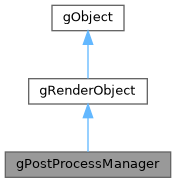
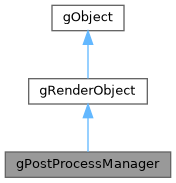
Public Member Functions | |
| gPostProcessManager () | |
| virtual | ~gPostProcessManager () |
| void | setDimensions (int width, int height) |
| void | addEffect (gBasePostProcess *effect) |
| void | enable () |
| void | disable () |
 Public Member Functions inherited from gRenderObject Public Member Functions inherited from gRenderObject | |
| gRenderObject () | |
| int | getScreenWidth () |
| int | getScreenHeight () |
| void | pushMatrix () |
| void | popMatrix () |
| Public Member Functions inherited from gObject | |
| gObject () | |
| void | logi (std::string message) |
| void | logd (std::string message) |
| void | logw (std::string message) |
| void | loge (std::string message) |
| void | logi (std::string tag, std::string message) |
| void | logd (std::string tag, std::string message) |
| void | logw (std::string tag, std::string message) |
| void | loge (std::string tag, std::string message) |
Additional Inherited Members | |
| Static Public Member Functions inherited from gRenderObject | |
| static void | setScreenSize (int screenWidth, int screenHeight) |
| static void | setUnitScreenSize (int unitWidth, int unitHeight) |
| static void | setScreenScaling (int screenScaling) |
| static void | enableShadowMapping () |
| static void | disableShadowMapping () |
| static bool | isShadowMappingEnabled () |
| static gRenderer * | getRenderer () |
| static void | destroyRenderer () |
| static void | createRenderer () |
| Static Public Member Functions inherited from gObject | |
| static std::string | gGetAppDir () |
| static std::string | gGetAssetsDir () |
| static void | gSetAssetsDir (std::string assetsDir) |
| static std::string | gGetFilesDir () |
| static std::string | gGetImagesDir () |
| static std::string | gGetFontsDir () |
| static std::string | gGetModelsDir () |
| static std::string | gGetTexturesDir () |
| static std::string | gGetShadersDir () |
| static std::string | gGetSoundsDir () |
| static std::string | gGetDatabasesDir () |
| static std::string | gGetVideosDir () |
| static void | setCurrentResolution (int scalingNo, int currentResolutionNo) |
| Static Public Attributes inherited from gObject | |
| static const int | LOGLEVEL_SILENT |
| static const int | LOGLEVEL_DEBUG |
| static const int | LOGLEVEL_INFO |
| static const int | LOGLEVEL_WARNING |
| static const int | LOGLEVEL_ERROR |
| Static Protected Attributes inherited from gRenderObject | |
| static bool | isshadowmappingenabled |
| Static Protected Attributes inherited from gObject | |
| static int | renderpassnum |
| static int | renderpassno |
| static int | releasescaling |
| static int | releaseresolution |
Detailed Description
To use this class, simply add the instance of this class to your Canvas's header file by: "gPostProcessManager ppm;". Then in your setup, first call setDimensions to specify the area of which you want your post-processing to happen. (Remember that currently it is only possible to post-process on the center of the screen. So it's recommended that you specify the width and height as your game's original width and height.)
Then, to add post-process effects to your manager, call addEffect(). As a parameter, you can use one of the default post-process effects that comes with the engine. Such as; gBlur, gGrayscale, gInversion etc. To actually add the effect, you can call the function with: "ppm.addEffect(new gBlur())" You can change the "new gBlur()" part with any post-process that you like. To use the effect, of course you have to include it first.
After setting the dimensions and adding your effects inside the setup (or any relevant work-once function), you can then use enable() function before the draw call of an object that's going to get affected by the post-process effect. After the draw calls of the ones that needs to get affected by post- process effects, simply call disable().
Constructor & Destructor Documentation
◆ gPostProcessManager()
| gPostProcessManager::gPostProcessManager | ( | ) |
◆ ~gPostProcessManager()
|
virtual |
Member Function Documentation
◆ addEffect()
| void gPostProcessManager::addEffect | ( | gBasePostProcess * | effect | ) |
Add a post-process effect to the manager by dynamically instancing it.
- Parameters
-
effect The effect instance that has been created with "new" keyword.
◆ disable()
| void gPostProcessManager::disable | ( | ) |
Finalizes the framebuffer textures and draws them on the default framebuffer. Call this after enable(), and after the draw calls that you want to apply post process.
◆ enable()
| void gPostProcessManager::enable | ( | ) |
Enables the post process manager to direct draw calls into the associated framebuffers. Call this before the draw calls that you want to apply post-process.
◆ setDimensions()
| void gPostProcessManager::setDimensions | ( | int | width, |
| int | height | ||
| ) |
Set the dimensions of which the post-process framebuffer will take effect.
- Parameters
-
width The width of the post-process framebuffer. height The height of the post-process framebuffer.
The documentation for this class was generated from the following file: